Google's 411 toll free service comes to Canada, allowing a user to call 1-800-GOOG-411 and using their voice allow them to lookup and call a business in Canada.
Read more directly from Google's Blog: http://googlemobile.blogspot.com/2008/06/talk-to-us-goog-411-now-available-in.html
Saturday, June 21, 2008

Saturday, June 09, 2007
Avaya's Buyout by Private Equity Firm is a Good thing
Read the following article to see how the buyout is good for Avaya customers:
http://www.networkworld.com/columnists/2007/060607-lippis.html?page=1
http://www.networkworld.com/columnists/2007/060607-lippis.html?page=1
Saturday, June 02, 2007
Avaya Buy Rumors continue, perhaps there is some substance to the madness
The potential list of buyers continues to grow, now siting Oracle and Microsoft as potential buyers, but still has Nortel, Cisco and Silver Lake as leaders in the pursuit.
Read more: http://www.computerweekly.com/Articles/2007/06/01/224473/cisco-nortel-frontrunners-in-avaya-acquisition-rumours.htm
Read more: http://www.computerweekly.com/Articles/2007/06/01/224473/cisco-nortel-frontrunners-in-avaya-acquisition-rumours.htm
Wednesday, May 30, 2007
Avaya Buyout Rumors
Avaya is under spectulation as a possible aquisition target in the past 3 days since they announced they are posponing their May 31st Analyst Call.
Avaya has declined on comment on this spectulation to date.
See more some articles on this speculation:
http://www.forbes.com/feeds/ap/2007/05/30/ap3769105.html
http://www.theglobeandmail.com/servlet/story/LAC.20070530.RAVAYA30/TPStory/Business
http://www.forbes.com/feeds/ap/2007/05/29/ap3767110.html
http://today.reuters.com/news/articleinvesting.aspx?type=bondsNews&storyID=2007-05-29T202914Z_01_N29329389_RTRIDST_0_AVAYA-UPDATE-2.XML
See the up to the date news on the Avaya Buyout Speculation from Google News:
http://news.google.ca/news?hl=en&ned=&ie=UTF-8&q=Avaya+buyout
Thursday, August 24, 2006
10 Gbps over twisted copper 10GBase-T
The IEEE in June approved the publication of the 802.3an-2006 standard, otherwise known as 10GBase-T. This document describes a physical layer (PHY) transmission device for 10Gbps Ethernet over twisted-pair copper. While running 10G Ethernet over this type of wiring was once thought to be impossible, standards makers relied on four technical building blocks to make 10GBase-T a reality: cancellation, analog-to-digital conversion, cabling enhancements and coding improvements.The IEEE in June approved the publication of the 802.3an-2006 standard, otherwise known as 10GBase-T. This document describes a physical layer (PHY) transmission device for 10Gbps Ethernet over twisted-pair copper. While running 10G Ethernet over this type of wiring was once thought to be impossible, standards makers relied on four technical building blocks to make 10GBase-T a reality: cancellation, analog-to-digital conversion, cabling enhancements and coding improvements.The IEEE in June approved the publication of the 802.3an-2006 standard, otherwise known as 10GBase-T. This document describes a physical layer (PHY) transmission device for 10Gbps Ethernet over twisted-pair copper. While running 10G Ethernet over this type of wiring was once thought to be impossible, standards makers relied on four technical building blocks to make 10GBase-T a reality: cancellation, analog-to-digital conversion, cabling enhancements and coding improvements.The IEEE in June approved the publication of the 802.3an-2006 standard, otherwise known as 10GBase-T. This document describes a physical layer (PHY) transmission device for 10Gbps Ethernet over twisted-pair copper. While running 10G Ethernet over this type of wiring was once thought to be impossible, standards makers relied on four technical building blocks to make 10GBase-T a reality: cancellation, analog-to-digital conversion, cabling enhancements and coding improvements.
Work on 10GBase-T began in 2002, and the IEEE task force that wrote the specification agreed that 10GBase-T would require roughly 1,000 times better cancellation of internal cable impairments, at more than six times the speed of 1000Base-T. Similar to 1000Base-T, 10GBase-T transmits on the wire in both directions simultaneously, so the weak far-end signals are received in the presence of echo and near-end crosstalk from the transmitters sending to the opposite end of the wire.
In consequence, echoes from the entire length of the wire needed to be canceled. In addition, 10GBase-T needed to expand the degree of noise reduction to the extent that significant cancellation of far-end crosstalk was required. This was solved through new parallel transform-based processing techniques, similar to those used in radar processing, and novel combined cancellation and equalization methods perform the required processing within a reasonable level of complexity.
The analog-to-digital converters posed another challenge. 10GBase-T would need to digitize the signal to approximately 10 bits of accuracy at least 800 million times each second. Digital correction and parallelization were brought to bear, and techniques were demonstrated that provided the required conversion speed and accuracy while dissipating low single-digit watts of power.
With this reduction to the noise of the transceiver and the crosstalk within the cable, the major source of noise in the system became crosstalk from other 10GBase-T links in adjacent cables. Cross-industry collaboration between cabling vendors and 10GBase-T PHY experts worked to minimize the alien crosstalk characteristics of copper cabling. Cabling vendors are putting the finishing touches on a cabling specification (TIA/EIA-568 Addendum 10), which defines new Category 6A cabling for 100-meter 10GBase-T, as well as a technical bulletin to address installed cabling (TSB-155), which describes testing and mitigation techniques. Several vendors have shipped pre-standard Category 6A cabling systems.
The final building block, coding improvements, shows that the ever increasing levels of silicon integration render commercially feasible what was once thought impractical. 10GBase-T uses a state-of-the-art low-density parity check (LDPC) code that approaches fundamental coding limits. LDPC codes were discovered in the 1960s but have been rarely implemented, because until recently decoders were considered too complex for commercial application.
In the late 1980s technologists realized that this computational cutoff rate for coding was not a fundamental barrier, and in the early 1990s this barrier was broken with highly integrated decoders for science applications, including deep space communications. 10GBase-T technology is pioneering the commercial use of these high-performance codes to achieve a low bit error rate.
10GBase-T is coming to silicon products this year through advancements in cancellation, conversion, cabling and integration. The standard extends the ease and familiarity of unshielded twisted-pair copper, and its RJ-45 connector, to the realm of 10Gbps operation.
This information is thanks to Network World:
http://www.networkworld.com/news/tech/2006/082106-10gbaset.html?t5
Wednesday, July 26, 2006
Free Management Tool for download
The following is a great free Network Management tool from a Startup in Austin, Texas. It can manage up to 250 Network devices and is free because Ads are displayed on GUI while you use the application, but it seems like a small price to pay for a Network Management System, especially compared even to Solarwinds and possibly HP Openview.
Check it out and download it from: http://www.spiceworks.com/
Check it out and download it from: http://www.spiceworks.com/
Wednesday, October 05, 2005
Article on "High-speed TCP eases WAN congestion"
Interesting article on how a new flavour of TCP can prevent WAN congestion by modifying the window.
Link to the article
Link to the article
Tuesday, September 20, 2005
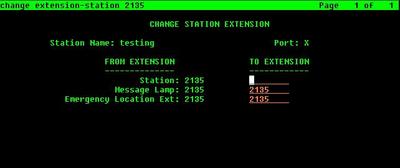
How to change an extension or station number on Avaya Communications Manager
Quick tip:
"change extension-station" from Communications Manager allows you to change the station number of station without having to recreate the extension.
Here is a screen shot of the command:
"change extension-station
Here is a screen shot of the command:

Using 46xxsettings.txt to apply settings based on MAC address of Avaya IP Phones
Here is just an example of how you can use the 46xxsettings.txt file to set options/settings on the 46xx Avaya IP phones by making entries in the 46xxsettings.txt file that is stored on the tftp or https server.
IF $MACADDR SEQGOTO HSECURITY
# HSECURITYSET
MCIPADD x.x.x.x
SET PHY2STAT 0
SET OPSTAT 000
SET STATIC 0
SET PROCPSWD 8123456
SET SNMPSTRING XYZ
#end
PS. You can find the MAC address of an IP Phone on the sticker on the back of the 46xx IP Phone, or by "status station" from the Communication Manager you can see the output below:

IF $MACADDR SEQ
# HSECURITYSET
MCIPADD x.x.x.x
SET PHY2STAT 0
SET OPSTAT 000
SET STATIC 0
SET PROCPSWD 8123456
SET SNMPSTRING XYZ
#end
PS. You can find the MAC address of an IP Phone on the sticker on the back of the 46xx IP Phone, or by "status station

Friday, August 19, 2005
Cisco hurting their reputation
Is Cisco killing their own reputation? by ZDNet's George Ou -- Last Wednesday in Las Vegas Nevada, Michael Lynn delivered a message to the IT world that they are not safe. On that same day, Mr. Lynn became unemployed and the target of a massive lawsuit from Cisco Systems. His only "crime" was that he exercised his first amendment right of free speech to talk about [...]
Tuesday, August 09, 2005
VoIP Security concerns for IT Managers
The following is an interesting link on hype of the security concerns in regards to VoIP, from Network World.
Click here to visit the article.
Click here to visit the article.
Wednesday, July 27, 2005
VoIP Security Articles
I came across some good articles on practices that should be taken to protect your VoIP network at the National Institute of Standards and Technology (NIST) website. These are definity worth taking a look at, you can find them here.
Monday, July 25, 2005
ROI for VoIP Article
Here is an interesting article from NetworkWorld on ROI (Return on Investment) for VoIP, it is based on Nemertes Research interviews with 65 IT executives at leading-edge companies across a range of industries.
Link to Article
Link to Article
Tuesday, July 19, 2005
VoIP Security Thesis Article
The following is a very interesting article on Security in VoIP - Telephony Systems that was written by a German University Student.
The following is the link to the PDF Article http://www.iaik.tu-graz.ac.at/teaching/11_diplomarbeiten/archive/thalhammer.pdf
The following is the link to the PDF Article http://www.iaik.tu-graz.ac.at/teaching/11_diplomarbeiten/archive/thalhammer.pdf
Thursday, June 02, 2005
A good HTTP Web Server for IP Phones
Now with Avaya IP Phone firmware R2.2 the phones can download their firmware using HTTP or HTTPS rather than using TFTP. So now you can a secure web server to provide the firmware to the IP phones. The following is a nice small HTTPD server that you can use for this: http://www.acme.com/software/thttpd/
Monday, May 30, 2005
How to enable TFTP service on Windows 2000 / 2003 Server
Copy the tftpd.exe file from \%systemroot%\system32\dllcache to \%systemroot%\system32.
Then, use the Microsoft Windows 2000 Server Resource Kit's Instsrv utility to create the service as follows.
instsrv tftpd c:\winnt\system32\tftpd.exe
To start the service, enter
net start tftpd
You have now created a TFTPD server on Win2K. To test the server, enter
tftp -i put
The service will create a directory named tftpdroot in \%SystemDrive%, and the file whose name you entered above will be in this directory. This is where the first issue arose. We already had an existing data directory that needed to be available via tftp, and we do not serve any content off the system drives of any servers – it is both a security and common sense issue. Therefore, the service needed to be configurable.
Because this isn’t a supported service, finding documentation on it wasn’t going to be easy, and after a few minutes with Google, I determined I’d have to create my own documentation. Since it only makes sense that a Microsoft application would look to the registry for configuration data, I grabbed my copy of RegMon, the free registry monitor from Systernals, and got busy.
After tweaking RegMon’s filter to only show the tftpd.exe process, and setting a highlight on the service’s registry key (HKLM\CurrentControlSet\Services\TFTPD), I started the service. Looking through the dozen or so highlighted registry accesses revealed the start of something good – an OpenKey attempt for this key:HKLM\CurrentControlSet\Services\TFTPD\Parameters
A quick glance in RegEdt32 showed that key didn’t exist, so let’s add it. Many Windows services have a Parameters key, so this is a good sign.
After adding the key, a stop and restart of tftpd shows a sequence of QueryValue commands – attempts to read a set of values. The values it is looking for were:
HKLM\CurrentControlSet\Services\TFTPD\Parameters\directory
HKLM\CurrentControlSet\Services\TFTPD\Parameters\clients
HKLM\CurrentControlSet\Services\TFTPD\Parameters\masters
HKLM\CurrentControlSet\Services\TFTPD\Parameters\readable
HKLM\CurrentControlSet\Services\TFTPD\Parameters\writable
BINGO! The first parameter tftpd is looking for is called directory. Let’s add a value of type REG_SZ with the value data set to “D:\tftpdata” (our tftp data directory). Following a restart of the tftpd service, we’ll retest (as described above) and we got it – the service now points to our data directory, and the file we just uploaded. Unfortunately, none of the other values are documented either, so they are probably best left alone.
Another TFTP Service available free of charge that will run on Windows is tftpd32 which can be found at http://tftp32.jounin.net/ and the following link discusses how to use it: http://thinstation.sourceforge.net/tftpd-service.html
Reference: http://www.wiredeuclid.com/modules.php?op=modload&name=News&file=article&sid=10
Thursday, May 19, 2005
Free Network Monitoring Tool
Torrus can be used as a Simple Network Management Protocol (SNMP) collector. A single server can handle a few hundred network devices and it's network discovery engine supports multiple vendors and device types.
It can collect information such as SAA agents, temperature sensors, CPU and memory statistics.
The key feature of Torrus is it's capability to monitor Cisco class-based quality of service (QoS), which is very useful in a network with VoIP devices. All of this is done in the system via the http web interface.
This software can be found at torrus.org
Thanks to Cisco's First Quarter 2005 Packet Magazine for this information.
Friday, May 06, 2005
Welcome!
Hello Everyone,
I would like to thank everyone who visits, I am going to try to keep this up to date will all of the latest information related to Voice over Internet Protocol (VoIP). I hope you find my posting informative.
I would like to thank everyone who visits, I am going to try to keep this up to date will all of the latest information related to Voice over Internet Protocol (VoIP). I hope you find my posting informative.
Subscribe to:
Posts (Atom)